

Introduction
Webhooks provide a way to receive notifications for your transactions in real time. While your transaction is being processed, its status progresses until it is completed. This makes it very important to get the final status for that transaction, and that's where webhooks are very beneficial.
Put simply, a webhook URL is an endpoint on your server that can receive API requests from Basqet’s server. Note that the request is going to be an HTTP POST request.
Setting your Webhook URL
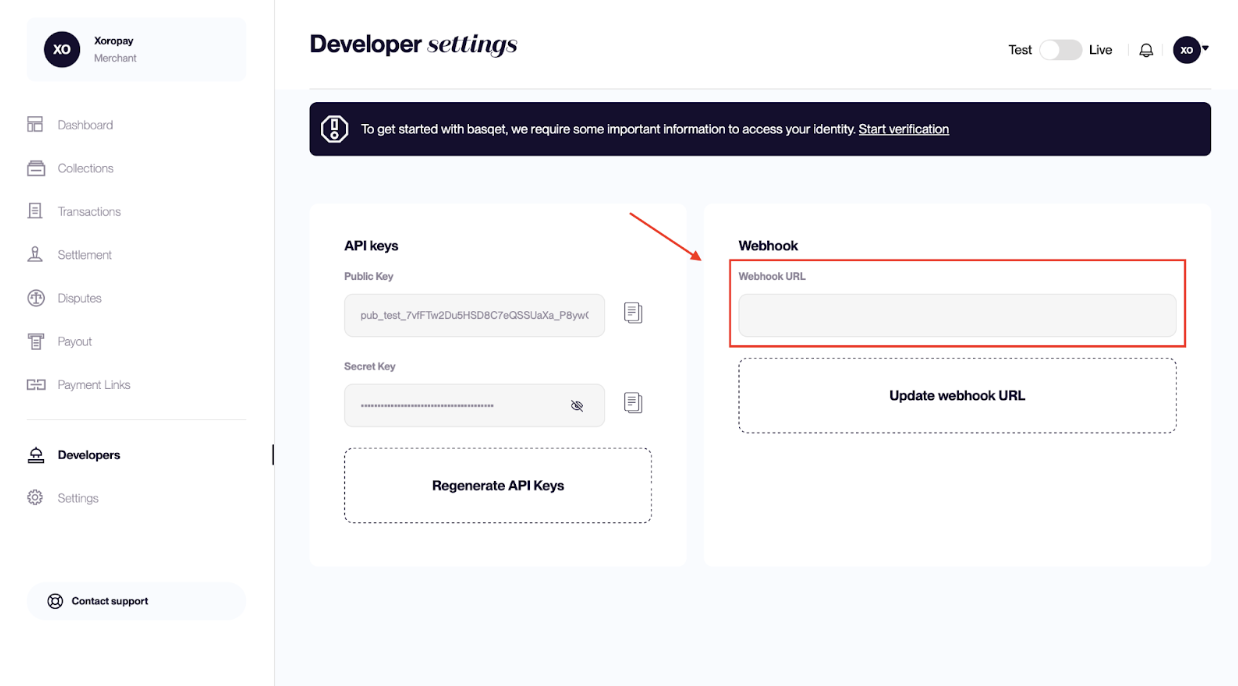
You can specify your webhook URL in the Developer Settings page of your dashboard. Make sure that the webhook URL is unauthenticated and publicly available.
The request to the webhook URL comes with a payload, and this payload contains the details of the transaction for which you are being notified.
Verifying a Webhook Request
Alongside the transaction verification endpoint, you can use this to verify that requests are coming from Basqet to avoid delivering value based on a counterfeit request. To verify our requests, you need to validate the signature assigned to the request.
Valid requests include a basqetSignature header, which contains an HMAC SHA512 signature of the payload generated with your secret key.
Confirm this is from Basqet by encrypting the payload we sent to you with HMAC SHA512 with your secret key. This is valid if it matches the basqetSignature header we sent to you.
Node JS Sample Code
var crypto = require('crypto');
var secret = process.env.SECRET_KEY;

// Using Express
app.post("/api/v1/test", function(req, res) {
    // Retrieve the request's body
    const payload = req.body;

    var hash = crypto.createHmac('sha512', secret).update(JSON.stringify(payload)).digest('hex');
    if (hash == req.headers['basqetSignature']) {
        // Do something with payload
        console.log(payload)
    }
    // return success
    res.send(200);
});```
Updated 7 months ago