

Testing Your Integration
Basqet provides a Test (Sandbox) environment that allows you to fully validate your integration before going live.
Because Test wallets do not accept real blockchain transfers, Basqet provides built-in tools that let you simulate payment outcomes directly from the payment page. This allows you to test your application logic, webhooks, and transaction handling without sending real crypto.
How Testing Works in Basqet
In Test mode, when you initiate a pay-in transaction, Basqet generates a payment page with:
- A test wallet address
- A QR code
- A transaction expiry timer
Since no real funds can be sent to this address, you complete the test by manually marking the transaction outcome using the available buttons or by using the transaction update test API.
This simulates how Basqet would behave if a real blockchain transaction occurred.
Simulating Payment Outcomes
In Test mode, you can simulate how a real customer payment would resolve through any of the following means:
Testing Payment Outcomes via Payment Link
In Test mode, payment outcomes can be simulated using a payment link.
Steps
- Create a payment link from your Basqet dashboard or via the API.
- Open the generated payment link.
- Enter the required payment details.
- Select the currency you want to pay with.
- On the test payment page, choose the button that corresponds to the outcome you want to simulate.
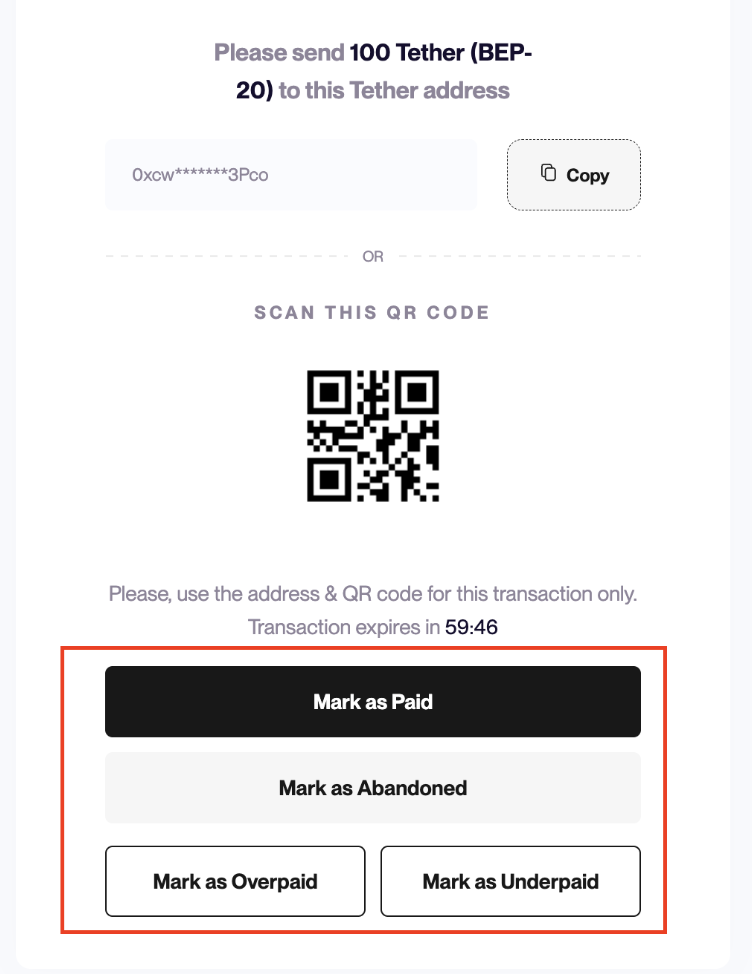
The button you select determines the transaction status that will be returned by the system. Refer to the table below for the available payment outcomes and the corresponding actions to simulate them.
| Payment Outcome | What It Represents | What You Should Test | How to Simulate |
|---|---|---|---|
| Successful Payment | Customer completes payment in full | Webhook delivery, transaction verification, balance updates, order fulfillment | Click Mark as Paid |
| Overpayment | Customer pays more than the required amount | Overpayment handling, reconciliation logic, credit/refund behavior | Click Mark as Overpaid |
| Underpayment | Customer pays less than required amount | Partial payment handling, retry/top-up flows, webhook behavior | Click Mark as Underpaid |
| Abandoned Payment | Customer starts but does not complete payment | Payment expiry, order cancellation, webhook processing for abandoned payments | Click Mark as Abandoned |
What Happens When You Click a Button
When you mark a transaction:
- The transaction status is updated immediately
- A webhook event is triggered (if configured)
- Your application receives the same signals it would in Live mode
This means your webhook handlers, transaction verification logic, order processing logic etc. can all be tested end-to-end without real payments.
Testing Payment Outcomes Via API
You can simulate payment outcomes programmatically using the Update a Test Transaction Status API. This is useful for testing how your system responds to different transaction scenarios without making real payments.
Endpoint Details
POST https://api.basqet.com/v1/transaction/{transaction\_id}/trigger
Action: Update Test transaction status
Method: Post
Path: /v1/transaction_id}/trigger
Headers
Authorization: Bearer bq\_sk\_{domain}\_s3cr3tk3y
Accept: application/json
Content-Type: application/json
Request Body
{
 "status": "successful"
}
The transaction_id is obtained after you initialize a transaction in test mode.
Simulated Payment Outcomes via API
| Payment Outcome | What It Represents | What You Should Test | How to Simulate via API |
|---|---|---|---|
| Successful Payment | Customer completes payment in full | Webhook delivery, transaction verification, balance updates, order fulfillment | {"status": "successful"} |
| Overpayment | Customer pays more than the required amount | Overpayment handling, reconciliation logic, credit/refund behavior | {"status": "overpaid"} |
| Underpayment | Customer pays less than required amount | Partial payment handling, retry/top-up flows, webhook behavior | {"status": "underpaid"} |
| Abandoned Payment | Customer starts but does not complete payment | Payment expiry, order cancellation, webhook processing for abandoned payments | {"status": "abandoned"} |
Example cURL Request
curl \--request POST \\
 \--url <https://api.basqet.com/v1/{transaction\_id}/trigger> \\
 \--header 'Authorization: Bearer bq\_sk\_{domain}\_s3cr3tk3y' \\
 \--header 'accept: application/json' \\
 \--header 'content-type: application/json' \\
 \--data '{
   "status": "overpaid"
 }'
What You Should Test
Before going live, you should test:
- Successful payment flow
- Failed or abandoned payments
- Overpayment and underpayment scenarios
- Webhook delivery and signature verification
- Transaction verification using the API
- UI behavior for each transaction state
Overall, your integration should correctly handle transactions in the following states:
- initiated
- pending
- successful
- overpaid
- underpaid
- abandoned
Important Notes
- The test buttons are only available in Test mode, as they do not exist in Live mode
- These test transactions do not move real funds and as such cannot be used for real payments
- Real wallet addresses only exist in Live mode
Recommended Testing Flow
- Initiate a test pay-in transaction
- Use the ‘update test transaction status API’ to send a simulated outcome (Successful, Overpaid, Underpaid, or Abandoned)
- Listen for the webhook event
- Verify the transaction using the API
- Confirm your system reacts correctly
Repeat this for all scenarios before switching to Live.
Updated 4 months ago