

Overview
Settlement is the process of transferring funds from your Basqet account balance to an external account that you control.
This allows merchants to withdraw funds received from payments and move them to their bank account or external crypto wallet.
Basqet supports two types of settlements:
| Settlement Type | Description |
|---|---|
| Fiat Settlement | Transfers funds from your Basqet balance to a bank account |
| Crypto Settlement | Transfers funds to an external cryptocurrency wallet |
Before initiating settlements, you must first add and configure your settlement accounts in the dashboard.
Managing Settlement Accounts
Settlement accounts are the external accounts where your funds will be sent during settlement.
You can:
- Add new settlement accounts
- Set a default settlement account
- Delete existing settlement accounts
These settings are managed from the Settlement Settings section of the Basqet dashboard.
Adding a Settlement Account
Follow these steps to add a new settlement account.
Steps
- Log in to your Basqet Dashboard
- Navigate to Settings
- Click Settlement Settings
- Locate the Settlement Accounts section
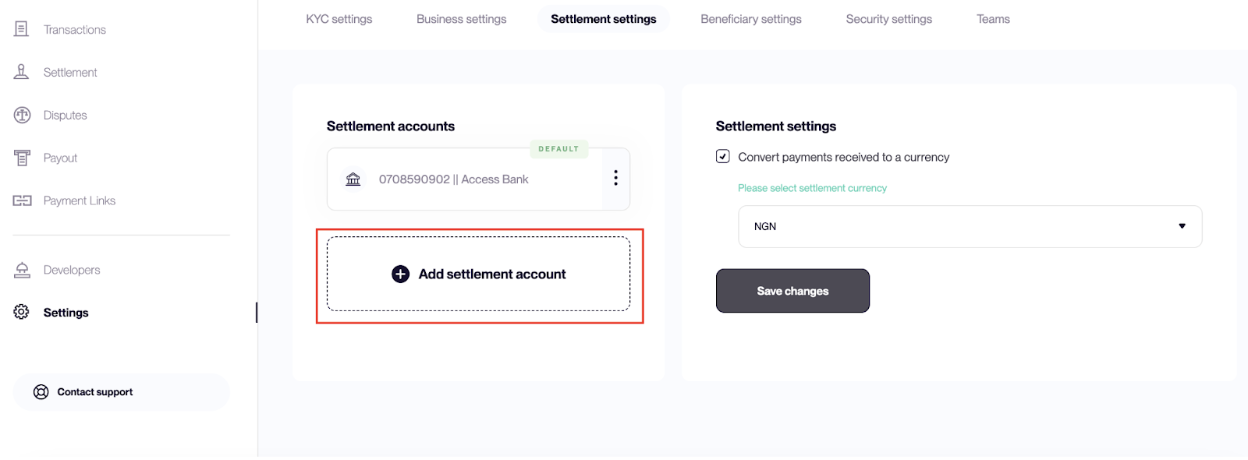
- Click Add Settlement Account
- Select the account type:
- Crypto
- Fiat
- Input the required details and save
Adding a Crypto Settlement Account
For cryptocurrency settlements, provide the wallet details where payouts should be sent.
| Field | Description |
|---|---|
| Currency | Select the cryptocurrency |
| Wallet Address | Enter the destination wallet address |
Ensure the wallet address matches the selected network to avoid loss of funds.
Adding a Fiat Settlement Account
For fiat settlements, provide your bank account details.
Select the account type:
- Domiciliary Account (USD)
- Euro Account (EUR)
- Naira Account (NGN)
- British Pound Sterling Account (GBP)
For NGN accounts, provide:
| Field | Description |
|---|---|
| Bank Name | Name of your bank |
| Account Number | Bank account number |
Additional fields may be required depending on the selected currency.
Setting a Default Settlement Account
If you have multiple settlement accounts configured, you can set one as the default account for receiving settlements.
Steps
- Log in to your Basqet Dashboard
- Navigate to Settings
- Click Settlement Settings
- Locate the Settlement Accounts section
- Click the three-dot menu next to the account you want to set as default
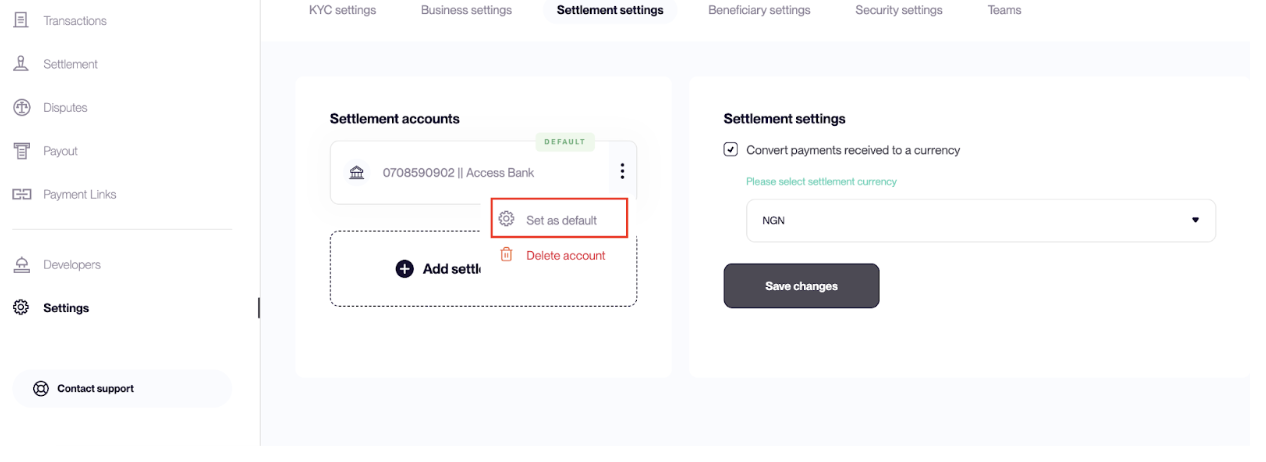
- Select Set as Default
- The selected account will be used as the primary destination for settlements.
Deleting a Settlement Account
You can remove a settlement account if it is no longer needed.
Steps
- Log in to your Basqet Dashboard
- Navigate to Settings
- Click Settlement Settings
- Locate the Settlement Accounts section
- Click the three-dot menu beside the account you want to remove
- Select Delete
Related Guides
- Receiving Settlement
Updated 7 months ago