

Payment Links
Overview
Payment Links allow you to accept payments without writing any code. Basqet generates a secure, hosted payment page that you can share with customers.
When a customer opens the link, they are taken to a Basqet-hosted checkout page where they can complete the payment using one of the supported currencies.
Payment links are ideal for merchants who want to start accepting payments quickly without integrating APIs or SDKs.
When to Use Payment Links
Payment links are best suited for:
| Use Case | Description |
|---|---|
| Invoicing | Send payment links to customers for products or services |
| Social Commerce | Share payment links on social media, WhatsApp, or email |
| Small Businesses | Accept payments without building a custom checkout |
Creating a Payment Link
You can create payment links directly from the Basqet Dashboard.
Steps
- Log in to your Basqet Dashboard
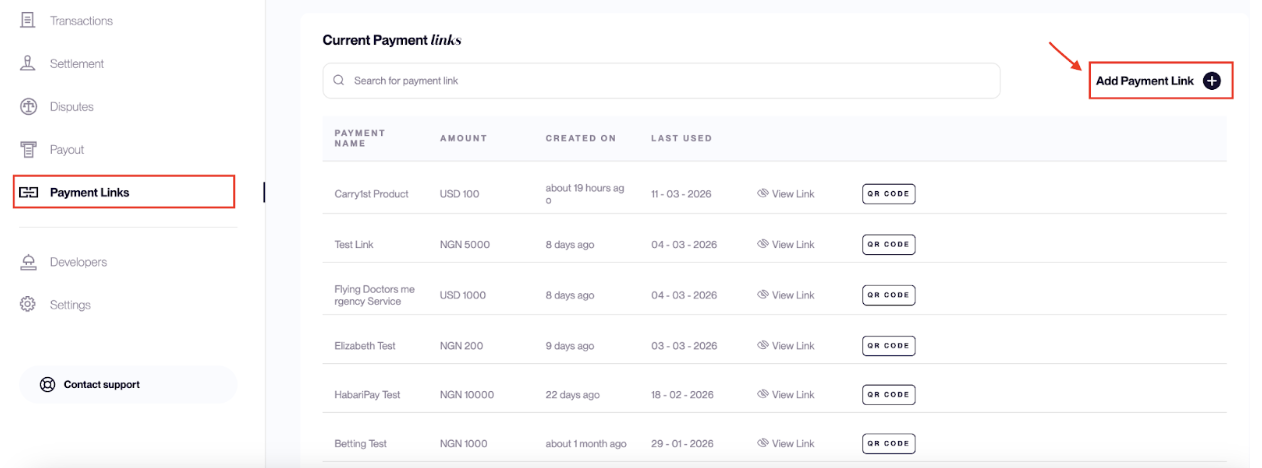
- Navigate to Payment Links
- Click Add Payment Link
- Enter the required payment details
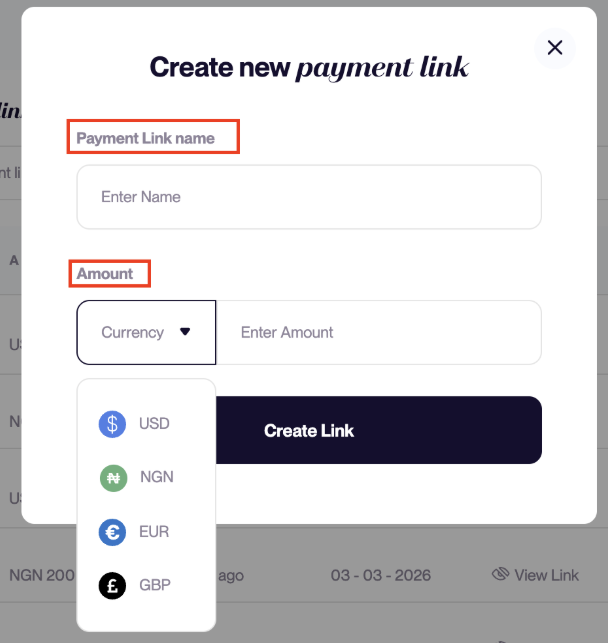
| Field | Description |
|---|---|
| Payment Name | Name used to identify the payment |
| Amount | Amount the customer needs to pay |
| Currency | The fiat currency (NGN, USD, GBP, or EUR) that the product or service is priced in. Basqet uses this currency to calculate the equivalent payment amount when customers choose a supported payment currency at checkout. |
- Click Create Link
Basqet will generate a secure payment URL that you can share with your customers.
Sharing a Payment Link
Once created, the payment link can be shared with customers through any channel. Common ways to share payment links include:
- WhatsApp messages
- Social media
- Website buttons
- SMS
To share a payment link:
- Hover over the specific link you want to share.
- Click the Copy Link button.
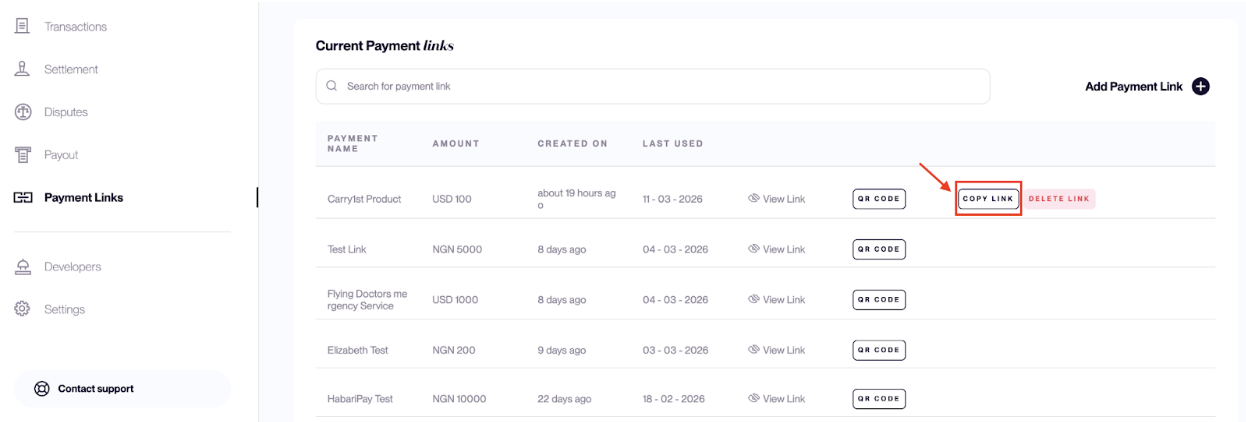
- Send the copied link to your customers through your preferred channel.
When customers receive the link, they simply click it and complete the payment on the Basqet-hosted payment page.
Payment Link Experience
When a customer opens the payment link:
- They see an email address input: This is used the identify customers that have made payments into a payment link.
- They click on ‘pay’ and select the currency they want to pay with.
- They are taken to a new page where Basqet calculates the exact equivalent payment amount and a wallet address to make the payment is also generated for them.
- The customer sends the payment to the generated address.
- The payment status updates once the transaction is confirmed.
- To view payments that have been made, go the the ‘transaction’ tab of your Basqet dashboard
Managing Payment Links
You can manage your payment links from the Payment Links section in your dashboard.
From this page you can:
- View all created payment links
- Copy and share payment URLs
- Delete links
Related Guides
- Simulating Payment Outcomes
- Handling Overpayments and Underpayments
Updated 7 months ago