

Receiving Settlements
Overview
Settlements allow merchants to transfer funds received from customer payments (pay-ins) to their external bank accounts or cryptocurrency wallets.
Because customers can pay using different currencies, Basqet allows merchants to define how incoming funds should be handled before settlement.
You can either:
- Convert all incoming payments into a single settlement currency, or
- Keep payments in their original currencies and settle each currency separately.
Choosing Your Settlement Currency
Customers may pay using different cryptocurrencies or supported payment currencies. Basqet allows merchants to automatically convert these inflows into a single preferred settlement currency.
Example
Suppose three different customers make payments:
- Customer 1 pays using USDT
- Customer 2 pays using BTC
- Customer 3 pays using BTC
If your settlement currency is set to NGN, all incoming payments will automatically be converted to Naira (NGN) before settlement.
This means that regardless of how customers pay, your funds will be consolidated into one currency.
Keeping Payments in Original Currencies
Alternatively, you can disable automatic conversion, and when this option is disabled, it means:
- Payments remain in the currency used by the customer** (this should be the currency quoted by merchant)
- Your wallet balance will show multiple currencies
- Settlements must be requested per currency
This option is useful for merchants who prefer to retain assets as they are paid rather than convert them automatically.
Setting Your Settlement Currency
To configure automatic conversion of incoming payments:
Steps
- Log in to your Basqet Dashboard
- Navigate to Settings
- Click Settlement Settings
- Locate the Settlement Settings section
- Toggle Convert payments received to a currency
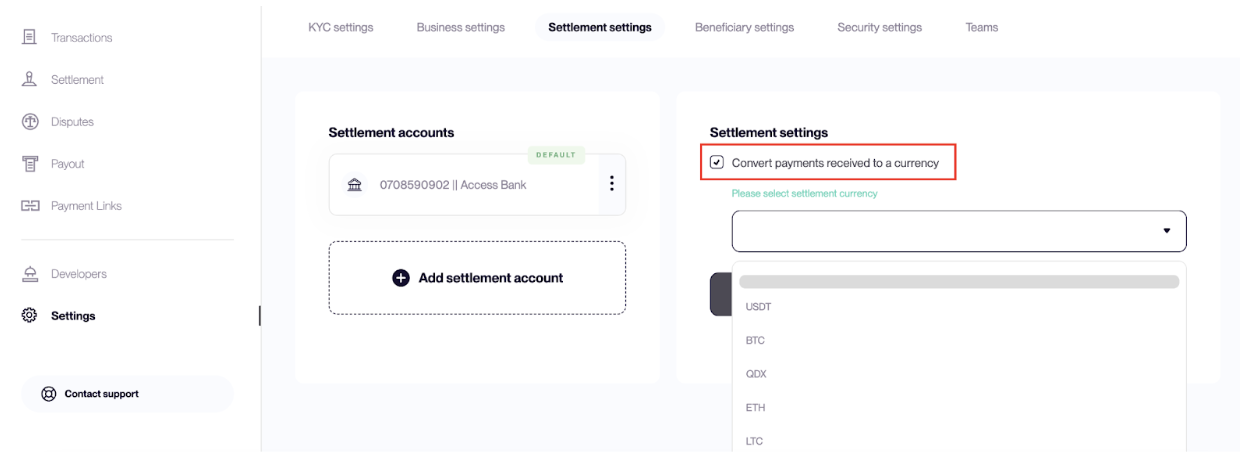
- Select your preferred settlement currency
Once enabled, all incoming payments will be converted to the selected currency.
Automatic Settlement
Automatic settlement currently applies to NGN (Naira). When enabled:
- Incoming payments are automatically converted to NGN
- Funds are automatically credited to the your bank account
- Note that for this to happen, you must have set a "Default" settlement account
No manual settlement request is required.
Manual Settlement
For other currencies, settlements must be requested manually when you want to withdraw funds.
Requesting a Settlement
Steps
- Log in to your Basqet Dashboard
- Navigate to Settlement in the navigation bar
- Click Request Settlement
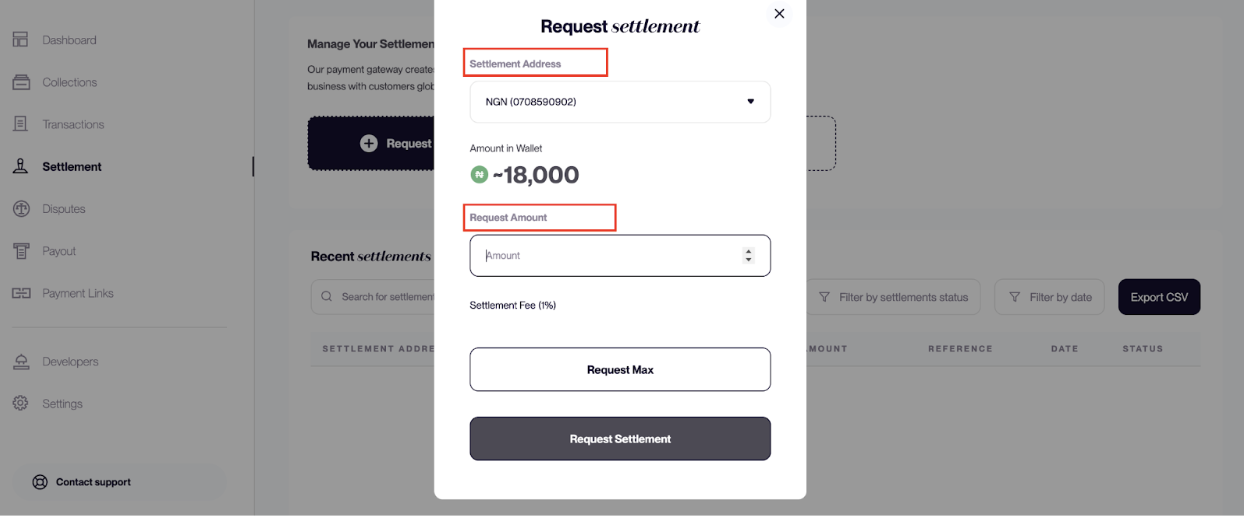
- Select the settlement account or wallet address
- Enter the settlement amount (or choose maximum amount)
- Click Request Settlement
The funds will then be transferred to the selected settlement account.
Settlement Processing Time
| Currency | Processing Time |
|---|---|
| NGN | Instant |
| Cryptocurrency | X days |
| EUR | X hours / days |
| USD | X hours / days |
| GBP | X hours / days |
Settlement times may vary depending on bank processing or blockchain network conditions.
Settlement Fees
Each settlement transaction carries a settlement fee which varies depending on currency. Merchants can choose how the fee is handled:
| Fee Option | Description |
|---|---|
| Merchant Pays | The fee is deducted from the merchant’s settlement amount |
| Customer Pays | The fee is added to customer payments at checkout |
If the customer-pays option is enabled, the settlement fee is included in the payment amount collected from the customer.
Related Guides
- Settlement Overview
- Managing Settlement Accounts
Updated 7 months ago